

A lot of people still compare ChatGPT, Claude, and Gemini like they are just three smart chat boxes with different personalities.
That is not the real difference anymore.
When it comes to AI sources for data gathering, the bigger difference is where each tool gets its information from. Today, that source can be live web search, uploaded files, connected apps, Gmail, Google Drive, Google Docs, or a mix of those depending on the product and setup.
That shift matters because a polished answer is not always a well-sourced answer. If one tool answers from older model knowledge, it may miss what changed this week. If one can search the live web, it has a better shot at fresh information. If one can see your email thread or project file, it may answer your real work question better than a tool that only sees public pages.
So the smarter question is not “Which AI is best?” It is “Which AI can reach the right source for this job?”
Best for mixed-source research
Strong when the task needs live web results, uploaded files, and follow-up synthesis in one place.
Best for work-context research
Strong when the answer lives inside Gmail, Drive, calendars, and connected workplace tools.
Best for Google-native workflows
Strong when your team already works inside Google Search, Gmail, Docs, Drive, Sheets, and Slides.
The Real Difference Is Source Path
Where Each Tool Gets Its Information From
Source Inputs
- Built-in model knowledge
- Live web search
- Uploaded files
- Connected apps and files such as Google Drive and SharePoint in supported setups
Source Inputs
- Built-in model knowledge
- Live web search
- Google Workspace connectors like Gmail, Google Calendar, and Google Drive
Source Inputs
- Built-in model knowledge
- Google Search grounding
- Google Workspace context such as Gmail, Docs, Drive, and related Google tools
The answer quality often depends less on the model name and more on whether the tool can reach the right source: the web, your files, your inbox, or your workspace.
When people say an AI tool is “good for research,” they often blur together several different things. Sometimes they mean live web search. Sometimes they mean it can summarize a PDF. Sometimes they mean it can read Gmail or Drive. Sometimes they mean it shows citations.
Those are not tiny product details. Those are the details that decide whether an answer is fresh, narrow, broad, private, or generic.
Think of it like three interns with different access badges. One can browse the web and check the files you gave them. One can also look through your inbox and calendar. One works especially well inside Google’s ecosystem, where Search, Gmail, Docs, and Drive are already part of the job.
Ask all three the same question and they may all sound smart. But they may not be pulling from the same evidence. That is why older comparison posts now feel incomplete. They compare writing style. They do not compare source access.
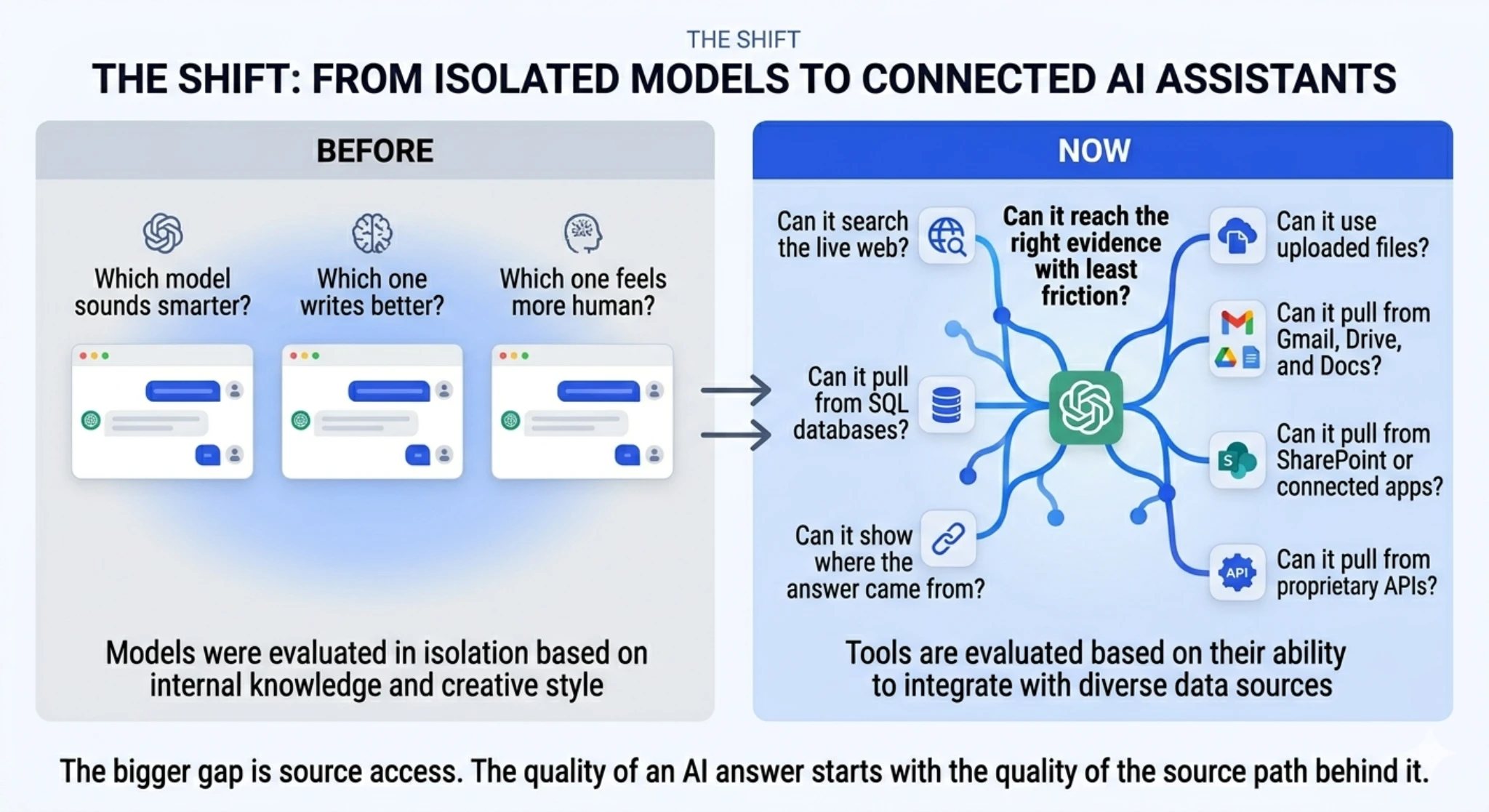
Before: most AI comparisons were model versus model.
Now: the real comparison is model plus search plus files plus connectors.
Before
- Which model sounds smarter?
- Which one writes better?
- Which one feels more human?
Now
- Can it search the live web?
- Can it use uploaded files?
- Can it pull from Gmail, Drive, and docs?
- Can it show where the answer came from?
ChatGPT: Best for Mixed-Source Research
ChatGPT is strongest when the work is messy in a normal real-world way.
Maybe you want to search the latest public information, compare it with a file you uploaded, and then turn both into a summary. That is not just web research. That is mixed-source work.
A simple example helps. Say you ask, “What changed in AI search this month, and how does that compare with the whitepaper I uploaded last week?” ChatGPT is a natural fit for that kind of blended task.
The catch is simple. Not every ChatGPT answer automatically comes from live search. Users still need to notice whether the answer came from model knowledge, search, files, or a mix.
That is why ChatGPT is no longer just part of a model-versus-model discussion. It now fits better into broader research workflows, which is also why comparisons like ChatGPT 4 vs 5 need to be looked at in a more practical way.
Prompt: “Compare this week’s AI search news with the PDF I uploaded.”
Source path: public web + uploaded file + synthesis.
Why it matters: this is where ChatGPT feels less like a chatbot and more like a research layer.
Claude: Best for Internal Context
Claude’s data-gathering story makes the most sense in two parts. First, it can use live web search. Second, it can work with connected workplace tools like Gmail, Google Calendar, and Google Drive.
That matters because many real questions are not just web questions. A public article can tell you what a company announced. Your inbox tells you what your team decided to do about it. Your Drive folder tells you which version your team is actually working from.
Claude is strong when the answer depends on that kind of internal work context.
For example: “Find the product launch email, check the latest draft in Drive, and tell me what changed.” That is a much better test of Claude than asking it to write a generic comparison paragraph.
The tradeoff is setup. Connector value depends on what is connected, what permissions exist, and what your environment allows.
Task: search internal context and explain it clearly.
Good fit: inbox history, calendar context, draft comparisons, internal work questions.
Why it stands out: the answer may live inside your own work systems, not just on the public web.
Gemini: Best for Google-Native Work
Gemini makes the most sense when your work is already spread across Google tools.
If your daily workflow lives in Gmail, Docs, Drive, Sheets, and Slides, Gemini can feel natural fast because you are not constantly moving information out of one system just to ask a question in another one.
A practical example looks like this: “Summarize the email thread, pull the key points from the project doc, and draft a recap.” That is not just an AI-writing task. It is an access task.
This is where Gemini becomes useful. It is not just “Google’s chatbot.” Its real strength is that it works close to where many teams already keep information.
The caution is simple. Better access does not remove the need to verify. If the wrong email thread or older doc gets pulled into the answer, the response can still drift.
Task: stay inside Google-native workflows.
Good fit: Gmail summaries, doc-based drafting, Drive lookups, Workspace-heavy collaboration.
Why it stands out: less friction when the work already lives inside Google’s ecosystem.
Same Question, Three Different Source Paths
This is where the comparison gets real.
Ask all three tools, “What changed in AI search this week?” On the surface, all three can help. But the follow-up changes everything.
If you next ask, “Now compare that with the PDF I uploaded,” ChatGPT becomes more compelling because mixed-source synthesis is the point.
If you instead ask, “Now compare that with the launch email and the latest Drive draft,” Claude and Gemini become more compelling because connected Google Workspace-style context matters more.
That is the part most generic AI comparison blogs skip. The best answer is often decided before the model starts writing. It is decided by which source path the product can actually reach.
| Task Type | ChatGPT | Claude | Gemini |
|---|---|---|---|
| Public web research | Strong when you want synthesis and follow-up in one place | Strong when you want web-backed results with a research-assistant feel | Strong when Google Search grounding is central |
| Uploaded file comparison | Best fit for blending files with public web context | Useful, but less defined by uploaded-file workflows than ChatGPT | Useful when the files live in Google’s ecosystem |
| Gmail and Drive context | Can help depending on connected setup | Strong fit for Workspace-connected context | Strong fit for Workspace-native context |
| Google-native workflow | Can work, but not the most natural home | Good if the connectors are set up | Best fit when the team already lives in Google tools |
| Cross-source synthesis | Strongest fit overall | Strong when internal work context is the main source | Strong when Google tools are the main source |
What Changed From Older AI Comparisons
Older AI comparison posts were mostly about the model. Which one writes smoother? Which one reasons better? Which one feels more human?
That is still part of the story, but it is no longer the whole story.
Now the real comparison is model plus tools. That means “best for research” no longer has one clean answer. It depends on whether the needed truth lives on the public web, inside a file, inside Gmail, inside Drive, or across several of those at once.
That is also why a simple feature checklist can mislead people. Two tools may both claim web access. That does not mean they fit the same job equally well.
Which One Fits Which Kind of Data Gathering?
When the work mixes sources
Best when you need public web research, uploaded files, and multi-step synthesis in one place.
When the answer lives in work context
Best when research really means finding the right internal context and explaining it clearly.
When the team already lives in Google
Best when staying inside Google Search and Workspace removes friction from the task.
That shift also matters for search and discovery. As AI answer engines keep changing how people find information, the conversation around GEO vs SEO becomes more relevant.
And if you want a more task-specific comparison after this, our breakdown of the best LLM for coding is a useful next read.
For readers who want a broader foundation before going deeper into tool comparisons, this overview of artificial intelligence and data science is a good place to start.
Final Takeaway
The gap between ChatGPT, Claude, and Gemini is no longer just style, speed, or model vibes.
The bigger gap is source access.
ChatGPT is compelling when the job needs public web results, uploaded files, and blended synthesis. Claude is compelling when the job depends on connected workplace context. Gemini is compelling when the work already lives inside Google Search and Google Workspace.
That is the real comparison. Not which model sounds smartest, but which one can reach the right evidence with the least friction.
If there is one rule worth remembering, it is this: the quality of an AI answer starts with the quality of the source path behind it.
FAQ
Does ChatGPT use live web search for every answer?
No. Users still need to notice whether the answer came from model knowledge, search, files, or a mix.
Can Claude read Gmail and Google Drive?
Claude is especially useful when the work depends on Workspace-connected context like Gmail, Calendar, and Drive.
Is Gemini just Google Search with a chat box?
No. Gemini is more useful to think of as a Google-native assistant that can work close to the tools where many teams already keep information.
Which tool is best for company emails and docs?
Usually the best choice is the one that can directly access the tools where that information already lives.
Can these tools still get things wrong even with search or connectors?
Yes. Better access helps, but it does not remove the need to check the source path and verify key claims.



